Understanding the Basics: Layer 2 vs. Layer 3 Networking
Networking in a home environment can often seem like a daunting task, especially when deciding between Layer 2 and Layer 3 configurations. Both layers play crucial roles in data communication, but they serve different purposes within a network. A clear understanding of these layers is essential to making an informed decision.
Layer 2: The Data Link Layer
Layer 2, known as the Data Link Layer, is responsible for node-to-node data transfer. It handles the physical addressing of devices using MAC (Media Access Control) addresses and ensures that data packets are free of errors during transmission. This layer is typically managed by switches.
- Advantages: Simple setup, lower cost, efficient for small networks.
- Disadvantages: Limited scalability, less control over data flow, prone to broadcast storms.
Layer 3: The Network Layer
Layer 3, or the Network Layer, adds routing functionality to the mix. It uses IP addresses to manage packet transfers across multiple networks, ensuring data finds the optimal path to its destination. Routers are primarily used for this purpose.
- Advantages: Greater control over traffic, enhanced scalability, effective for larger networks with complex topologies.
- Disadvantages: More complex setup, higher cost, requires more technical knowledge.
When to Use Layer 2 Networking at Home
For many home users, a straightforward network that connects a limited number of devices is sufficient. In such cases, Layer 2 networking often provides all the necessary functionality. Here are some scenarios where Layer 2 is the ideal choice:
Simplicity and Cost-Effectiveness
If your primary goal is to establish a simple network for connecting personal devices like laptops, smartphones, and printers, a Layer 2 network is likely sufficient. Switches are less expensive than routers and offer a plug-and-play experience that's easy to manage without specialized networking knowledge.
Small Scale and Limited Devices
For homes with fewer than ten devices or where the network layout isn't complex (e.g., all devices are in close proximity), Layer 2 networking offers adequate performance. It's particularly effective when all devices need equal access to shared resources like printers or external storage drives.
Low Bandwidth Demands
If your internet usage is mainly for activities such as browsing or streaming from one or two devices, Layer 2 networking efficiently handles these needs. The absence of complex routing tasks means less latency in device communication.
When to Opt for Layer 3 Networking at Home
For tech enthusiasts or families with high-performance networking requirements, transitioning to a Layer 3 network could be advantageous. Here are reasons why you might opt for this approach:
Need for Scalability and Advanced Features
If your network involves numerous smart home devices or IoT gadgets, or if you frequently add new devices, a Layer 3 setup will offer greater scalability. Routers can efficiently handle growing numbers of connections and provide features like VLANs (Virtual Local Area Networks) for better traffic management.
High Performance and Customization
Gamers and remote workers often require high-speed and reliable connections. A Layer 3 network can prioritize traffic for critical applications through Quality of Service (QoS) settings. Additionally, it allows for custom configurations tailored to unique network demands.
Complex Network Layouts
Homes with multiple floors or rooms with wired connections benefit from a Layer 3 setup. This architecture can optimize paths across different network segments and efficiently manage traffic flows between them.
The Trade-offs: Making an Informed Decision
Your choice between Layer 2 and Layer 3 networking depends on various factors including budget, technical expertise, and performance requirements. Here's a checklist to help guide your decision:
- Assess network size: Fewer than ten devices? Consider Layer 2.
- Consider device diversity: Many smart home gadgets? Lean towards Layer 3.
- Evaluate bandwidth needs: Casual browsing suits Layer 2; gaming or telecommuting might need Layer 3.
- Plan for future growth: If you anticipate expanding your network significantly, start with Layer 3.
Implementation Tips for Home Networking
Once you've decided on the appropriate layer for your home network, follow these practical tips for successful implementation:
Selecting Hardware
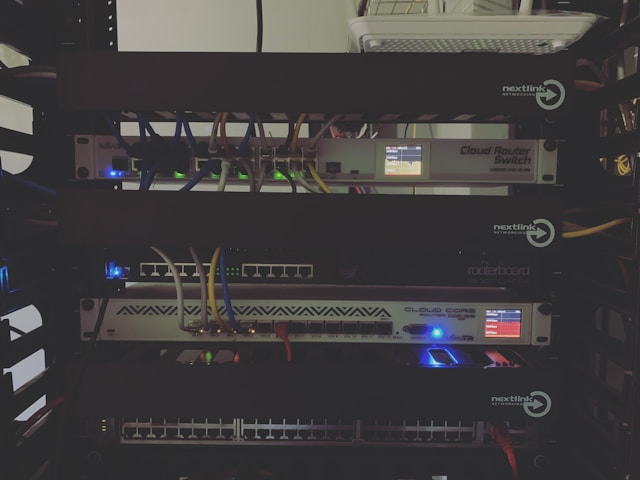
If opting for a Layer 2 network, consider investing in a robust switch capable of handling your current needs with room for minor expansion. For Layer 3 networks, choose a router that supports advanced features like firewall protection and VPN capabilities if remote work is a priority.
Cabling and Setup
A well-organized cabling system reduces clutter and enhances performance. For larger homes, consider structured cabling solutions that centralize connections to improve management and troubleshooting efficiency.
Network Security
No matter which layer you choose, securing your network against unauthorized access is crucial. Implement WPA3 encryption for wireless networks and regularly update firmware on all devices to protect against vulnerabilities.
Conclusion: Aligning Network Design with Your Needs
The choice between Layer 2 and Layer 3 networking in a home environment hinges on aligning your technical requirements with practical considerations such as cost and complexity. By understanding the distinctions between these two approaches and evaluating your own networking needs, you can build a system that not only meets today's demands but is also poised for future growth.